

TrekGuider @trekguider
TrekMail: The Email Platform Behind TrekGuider
Every email you get from TrekGuider comes through TrekMail. Here is the full tour of the email service I built alongside the marketplace: what it does, what it costs and who it is for.
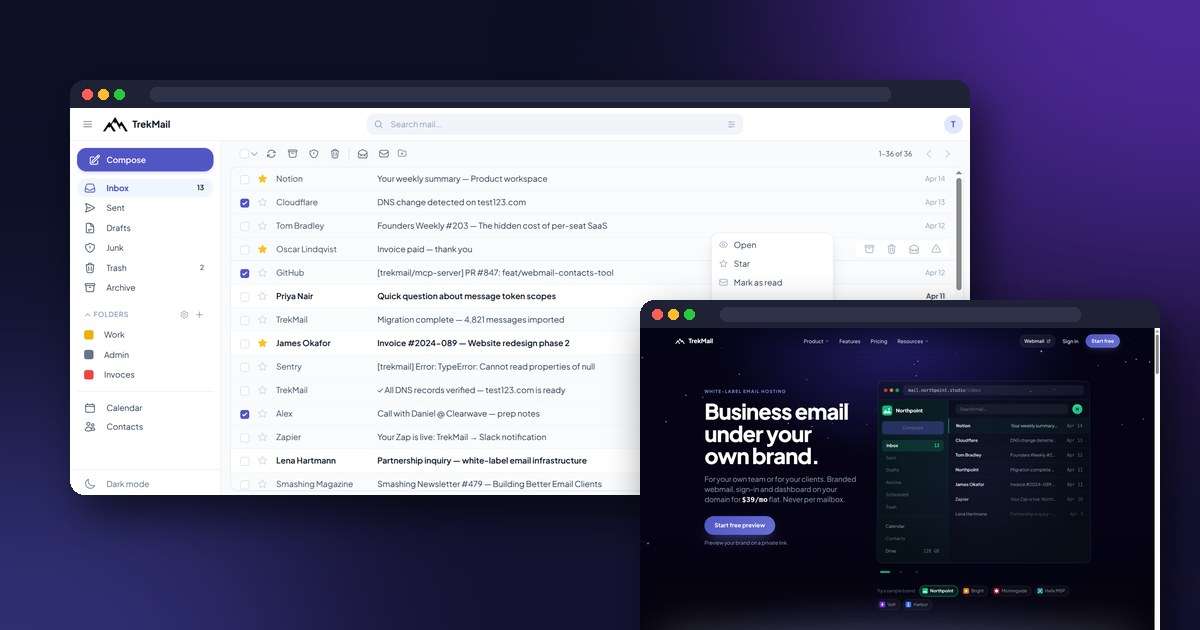
Every email you get from TrekGuider comes through TrekMail. Your receipt after a purchase, the link that confirms your account, the heads-up that a payout is on its way. Our own team inboxes live there too.
That's not a sponsorship deal. I built both. TrekGuider is the marketplace you're on right now. TrekMail is an email service I started in November 2025, because business email had gotten expensive and complicated for no good reason. You pay for every person, you pay extra for the basics, and setting it up feels like a part-time job.
So here's the full tour: what TrekMail does, what it costs, and who it's for. It's a long one, because there's a lot in there. I wrote it for the people who read TrekGuider. That means creators who sell guides and maps, small travel businesses, and agencies that handle email for their clients.
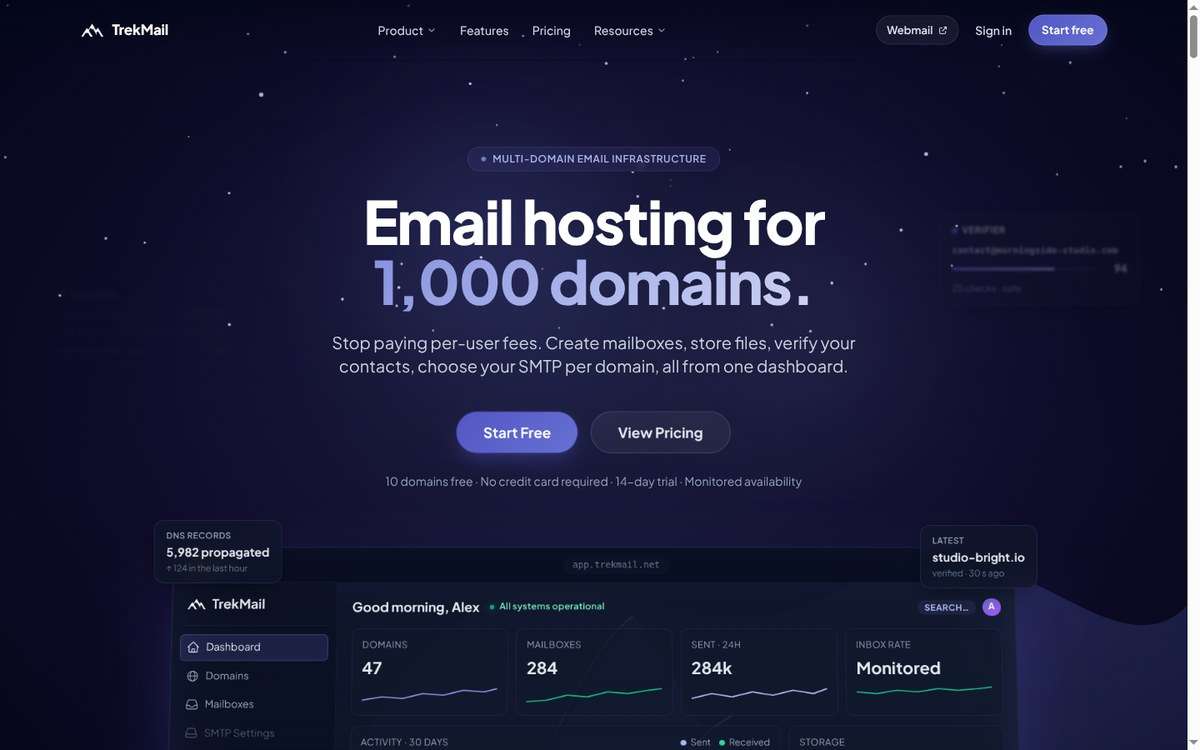
TrekMail's home page. One dashboard for every domain, inbox and file.
Why your travel business needs its own email address
If you sell anything on TrekGuider, you're running a business. Your email address is often the first thing a partner sees.
It looks professional. A pitch from hello@yourchannel.com lands differently than one from a free address with your birth year in it. Tourism boards and brands get a lot of collaboration requests. A real business address is the cheapest way to stand out.
It's yours for good. An address on your own domain belongs to you. If you ever switch email providers, you keep the address. That matters once it's printed on your products, your channel and years of conversations.
Your emails actually arrive. When you send a newsletter or a launch announcement, email providers check whether the message really comes from you. With your own domain set up properly, your mail is far less likely to end up in spam.
Business stays separate. A business inbox is easy to share with an assistant or an editor later. Your personal inbox isn't.
What TrekMail is
TrekMail is email for anyone with their own domain. That could be one person, a team, or an agency that runs email for its clients.
The big difference is how you pay. You pay for your account, not for each person. Your plan includes a set number of domains and inboxes plus one shared pool of storage. Adding a teammate or a second brand doesn't make your bill go up.
On top of email you get:
- a web inbox that works in any browser and on your phone
- cloud storage for big files
- a tool that checks whether email addresses are real
- White Label, so agencies can offer email under their own brand
- a way to let AI assistants like ChatGPT and Claude handle the busywork
The whole thing is available in 13 languages: English, Spanish, French, German, Portuguese, Italian, Dutch, Russian, Chinese, Japanese, Korean, Arabic and Hebrew.
Getting started
Here's what setup looks like from zero:
- Create an account. Sign up with your email, or with your Google, Microsoft, Facebook or X account.
- Add your domain. Type it in. If you have several, paste the whole list at once.
- Connect it. TrekMail shows you exactly what to add in your domain settings and checks it for you. If your domain is on Cloudflare, or with a registrar that supports one-click setup, TrekMail can do this step for you.
- Create your inboxes. Make them yourself, or send invites so each person picks their own password.
That's it. You can sign in to the web inbox right away, and mail starts arriving as soon as your domain is connected. Your address works in any email app on your phone or laptop too.
Domains and inboxes
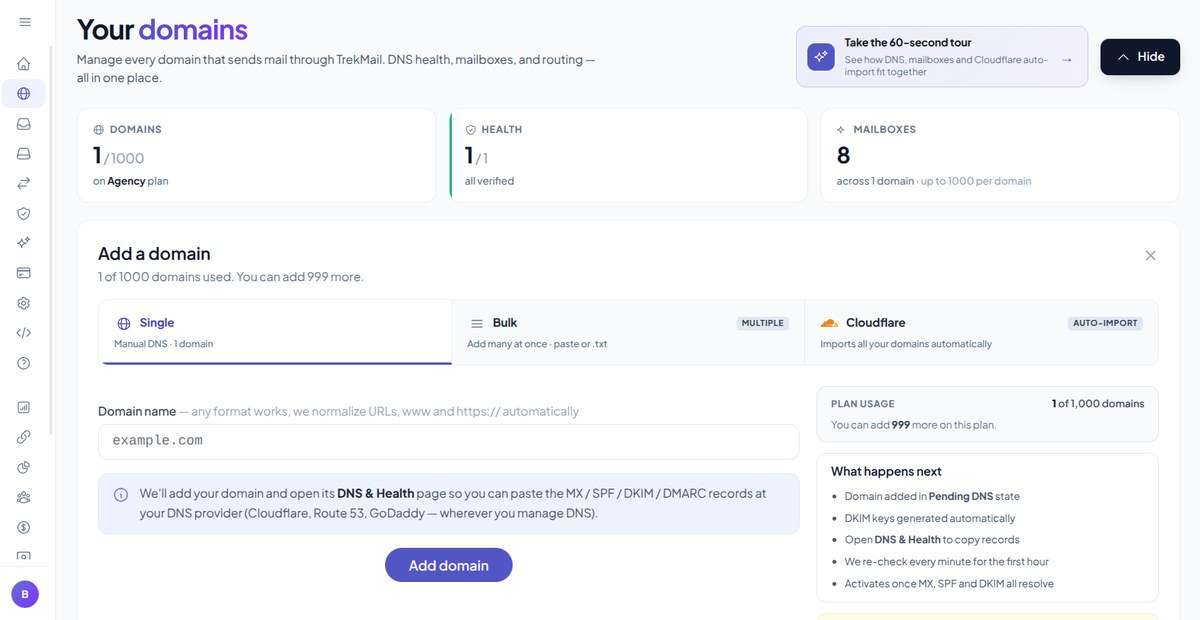
Your domains in one place, with their health and inbox count at a glance.
Lots of domains, one account. Depending on your plan, one account holds anywhere from 10 to 1,000 domains. If you run a channel, a shop and a side project, they can all live in the same place with one bill.
Inboxes your way.
- Create an inbox yourself and set its password, or send an invite so the person sets their own. You never have to handle anyone else's password.
- Need 40 inboxes for a new team? Create up to 500 in one go.
- Everyone shares one storage pool. If one person keeps years of email, you can give their inbox its own limit so it doesn't eat everyone else's space.
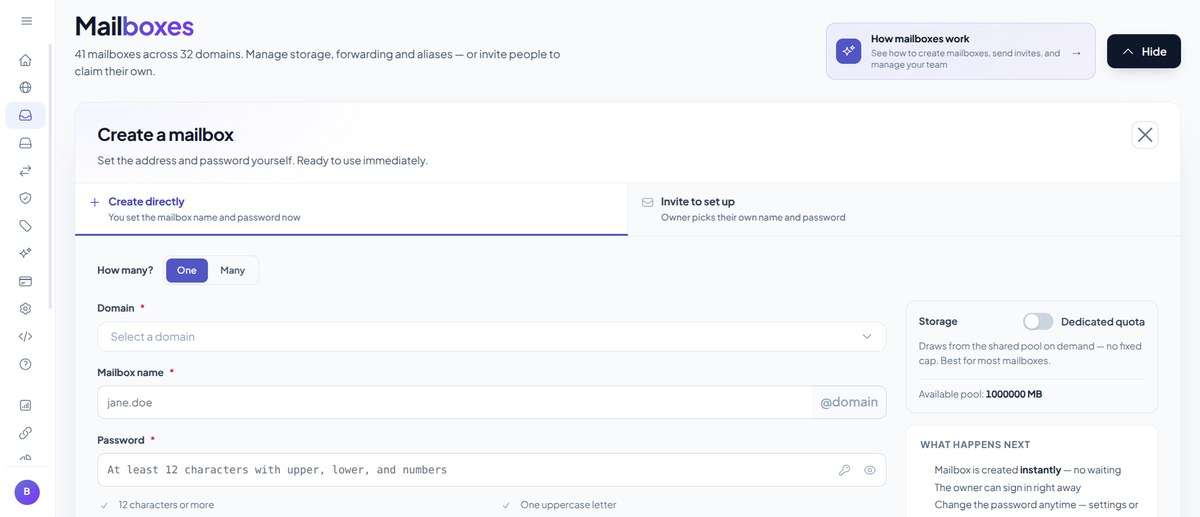
Create an inbox directly, or invite someone to set it up themselves.
Addresses that work the way you do.
- Extra addresses for one inbox. bookings@, press@ and hello@ can all land in the same place.
- A catch-all. Mail sent to a misspelled address still reaches you instead of bouncing.
- A second domain that mirrors the first. Own yourbrand.com and yourbrand.co? Point both at the same inboxes.
- Forwarding. Send copies to another inbox, set up so other email providers don't mistake them for fakes.
- Shared inboxes. A few people can answer support@ together without passing a password around.
- An out-of-office reply for when you're on the trail with no signal.
- Filters that sort your mail for you.
Day-to-day control.
- Pause an inbox, or block its sign-ins, whenever you need to.
- Deleted an inbox by mistake? You have seven days to bring it back.
- You can add a note to any domain or inbox, so you remember why it exists.
Moving in from Gmail, Outlook and others
Switching email is scary mostly because of the old messages. TrekMail brings them with you.
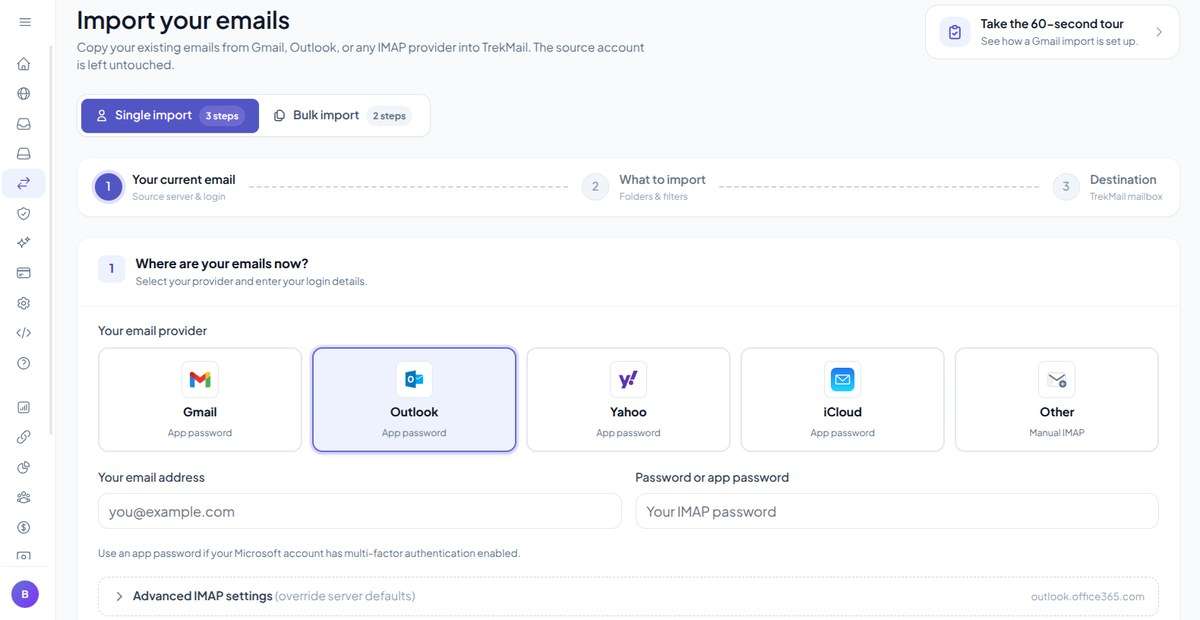
Pick where your email lives now. TrekMail copies it over and leaves the original untouched.
- One inbox: choose Gmail, Outlook, Yahoo, iCloud or any other provider, sign in, and pick what to bring over.
- Lots of inboxes: upload a list and TrekMail moves them all, while you watch the progress. Anything that hiccups can be retried or resumed.
- Your old account stays as it was. The import copies your mail. It doesn't delete anything from the old provider, so you can check everything arrived before you switch over.
You can also bring your contacts over from a spreadsheet or a contacts file.
Keeping your email safe and your mail out of spam
This is the stuff nobody brags about. It's also what decides whether you can trust your email.
Sign-ins stay safe.
- Turn on two-step sign-in for your account, and for each inbox separately. That matters when the inboxes belong to staff or clients.
- Email apps can get their own separate passwords. Your main password never sits on a phone you might lose, and you can switch off one app without touching the others.
Spam stays out. A spam filter checks everything that comes in and gets smarter every time you or your team mark something as spam. You can also block any sender for good.
You can see what happens to your email. For each domain you can see how many emails went out, how many were delivered and which ones bounced, plus how much spam was caught on the way in. Problems show up before a customer has to tell you.
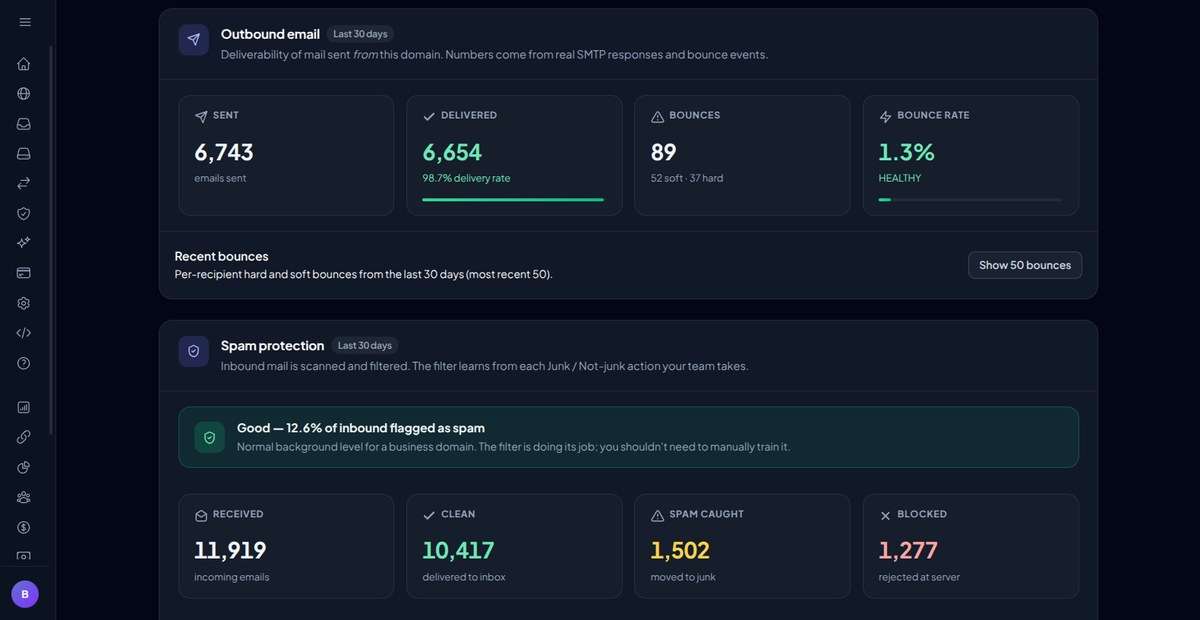
Sent, delivered and bounced on top. Spam caught and blocked below.
Your own sending service, if you have one. Already pay for a service like Postmark, Amazon SES or Mailgun? Connect it to any domain and that domain's mail goes out through it.
Proof that your mail is really yours. TrekMail sets up the records that prove to Gmail, Outlook and everyone else that your emails really come from you. That's a big part of what keeps your newsletters and pitches out of spam folders.
A web inbox built for working on the road
TrekMail has its own web inbox. I built it from scratch this year. A lot of it was written on hotel and café Wi-Fi, so it's made for that kind of life.
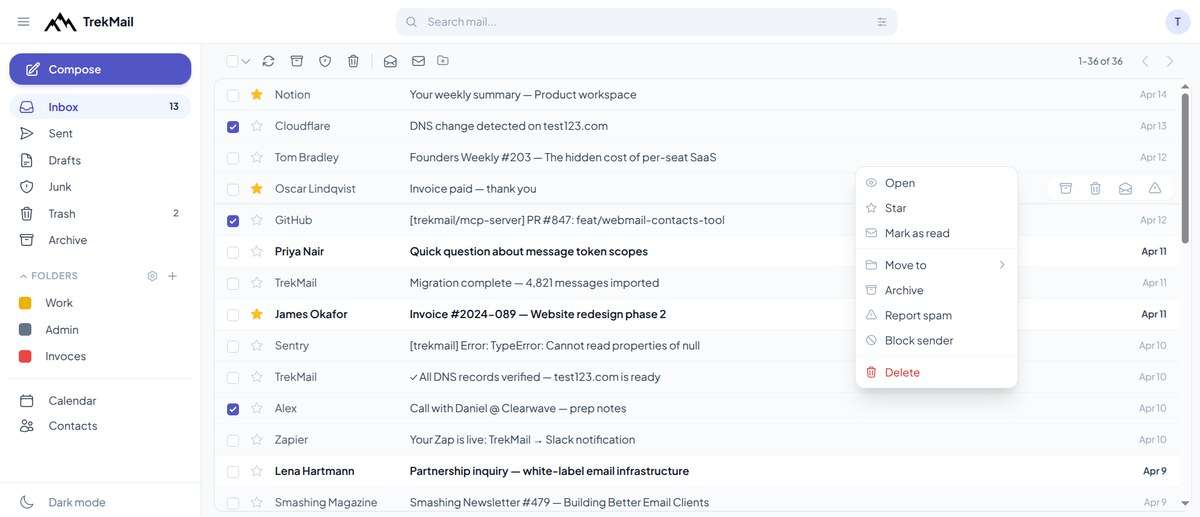
The web inbox. Folders on the left, everything you can do with a message one right-click away.
Every inbox in one place. See up to 25 inboxes in a single list. You can also connect accounts you have elsewhere, like Gmail, Outlook, iCloud or Yahoo. When you reply, the message goes out from that account the normal way, so nothing looks off to the person you're writing to.
Search that actually finds it. Search one folder, every folder or every inbox at once. Narrow it down by sender, subject, words in the message, date or attachments.
Writing without regrets.
- Undo send gives you a few seconds to change your mind.
- Scheduled send means your email lands at 9 a.m. in your partner's time zone, not 3 a.m.
- Templates cover the emails you write every week.
- Different addresses and signatures: send from several addresses, each with its own signature, logo included.
- Default copies: automatically CC or BCC someone on everything you send, like a bookkeeper or an archive address.
- Read receipts are there when you need to know a message was opened.
Calendar and contacts included.
- Accept invites and set reminders.
- Import events from other calendars.
- Keep contact groups, and import or export your contacts any time.
- Your calendar and contacts can sync to your phone's own calendar and contacts apps.
Make it yours.
- Light or dark mode.
- A reading pane on the right, below, or off.
- Messages grouped into conversations.
- Colored folders and desktop notifications.
- Keyboard shortcuts for the things you do all day.
- Install it on your phone or laptop like a regular app.
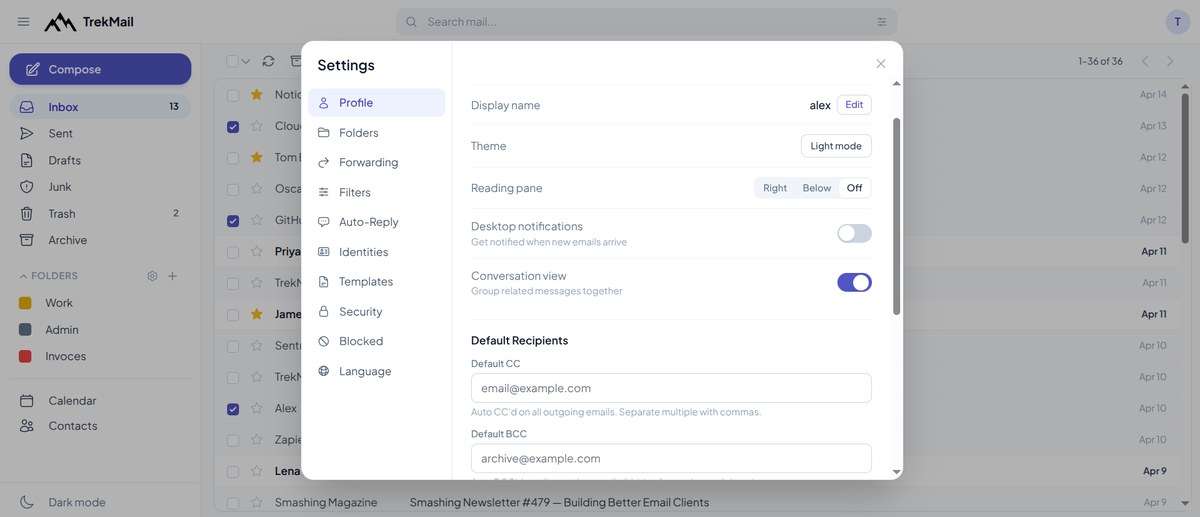
Settings: forwarding, filters, auto-reply, sending addresses, templates, security and language.
The little things.
- Attachments too big for email turn into a download link automatically, so your message doesn't bounce.
- Images in emails load through TrekMail first, so senders can't see where you're opening their mail from.
- Preview attachments without downloading them, or download them all at once.
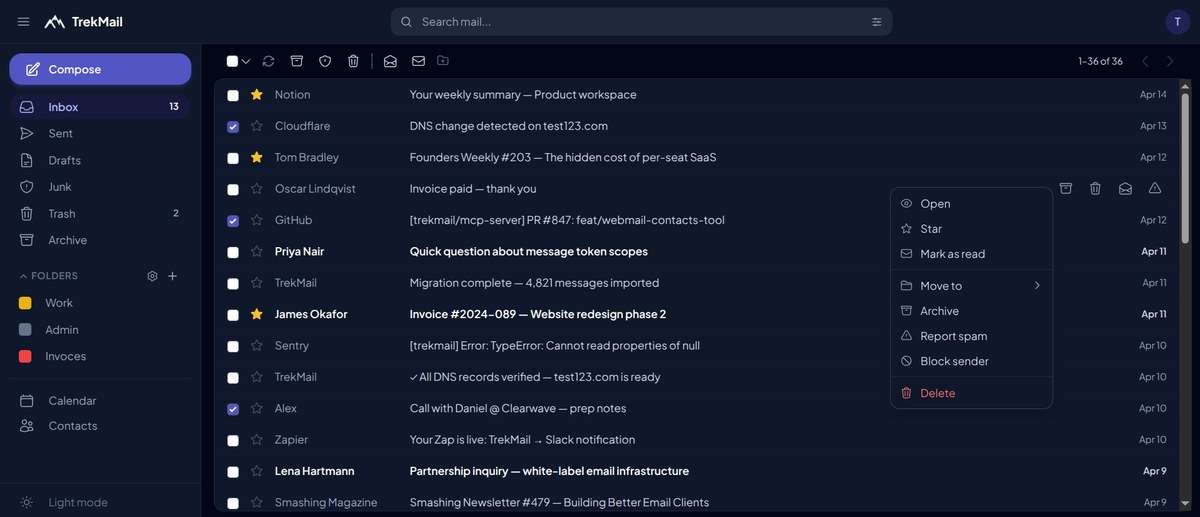
Same inbox, dark mode.
Prefer the email app you already use? That works too. Apple Mail, Outlook, Thunderbird, the Gmail app and pretty much any other email app can connect. Many of them set themselves up as soon as you type your address, and iPhone and Mac users can download a ready-made setup file.
TrekMail Drive: room for all that footage
This is the part creators ask me about most. Drive is cloud storage in the same account as your email. You pay for how much space you need, not for how many people use it.
Our Drive page says it best: "Empty a card of 4K footage into it from a hotel wifi."
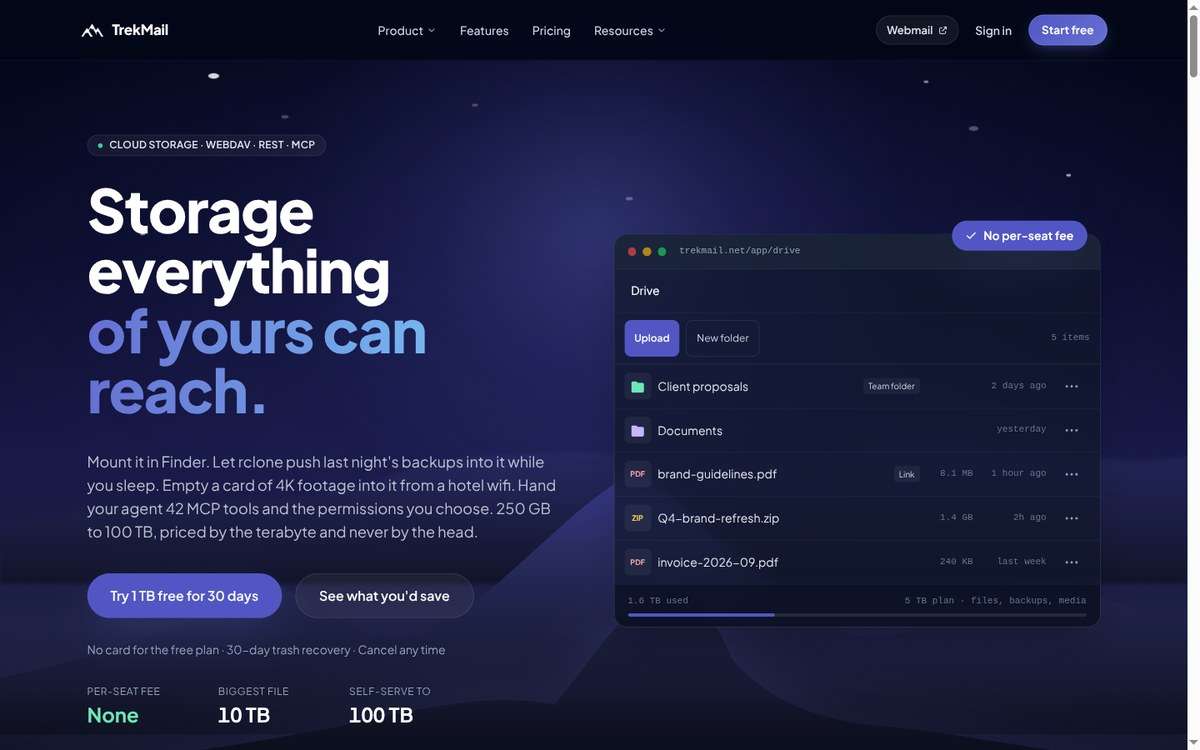
Drive lives next to your email. Folders, team folders and share links in one place.
How you can use it.
- Upload and organize files in your browser.
- Connect it to your Mac, Windows or Linux computer so it shows up like a regular drive.
- Open it on your phone with a file app.
- Send a link instead of a giant attachment. Set an expiration date, cap the number of downloads, or switch the link off any time.
- Share a folder with everyone on your team.
- Use it as the destination for automatic backups.
- Store files as big as you'll ever need. A single file can be up to 10 TB.
Peace of mind.
- Every device gets its own password. If you lose a laptop, you switch off that one device and you're done.
- Deleted files stay in the trash for 30 days, just in case.
What it costs.
- 250 GB: $3.20 a month
- 500 GB: $5.60 a month
- 1 TB: $11.20 a month
- Bigger sizes go all the way up to 100 TB, at $11.20 per TB
- Pay yearly and get two months free
- On White Label? Take 10% off
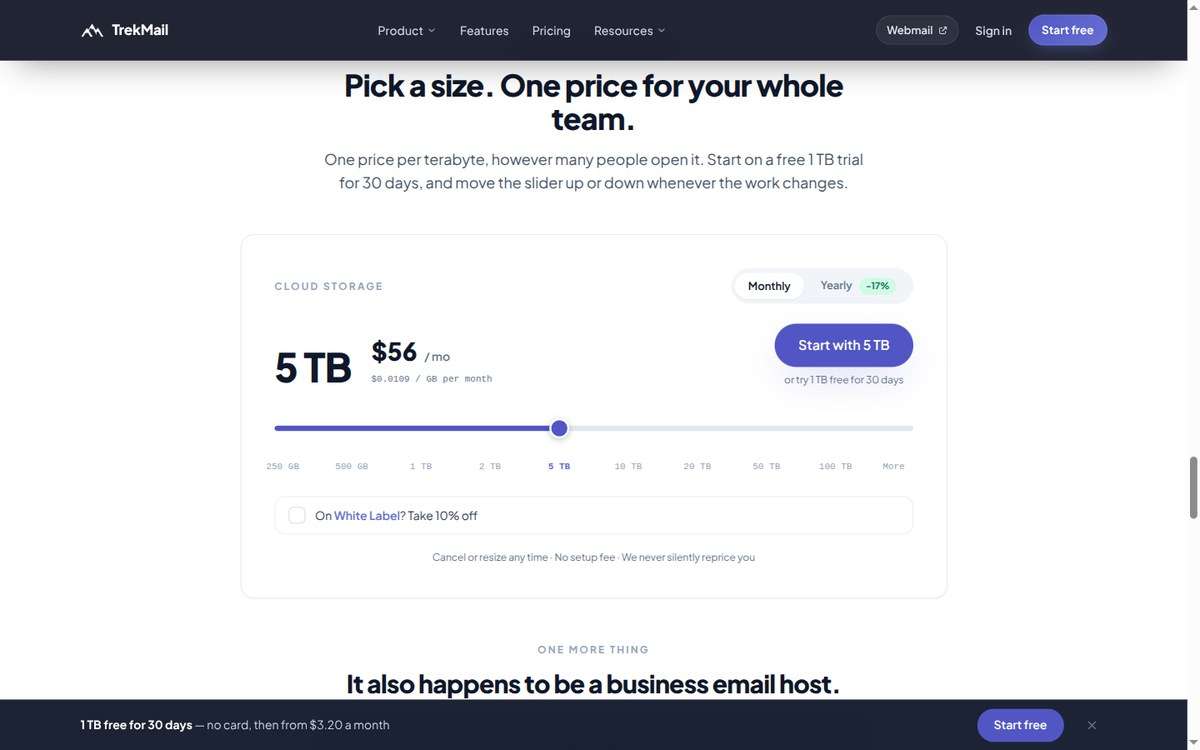
Pick a size with the slider. One price for the whole team.
You can try 1 TB free for 30 days, no card needed. For a team, that's the whole point. A terabyte costs the same whether one person uses it or twenty.
Email Verifier: clean up your list before you hit send
If you've collected emails from a giveaway, a free download or a list of brand contacts, some of those addresses won't work. Sending to them hurts your reputation with email providers and wastes your send.
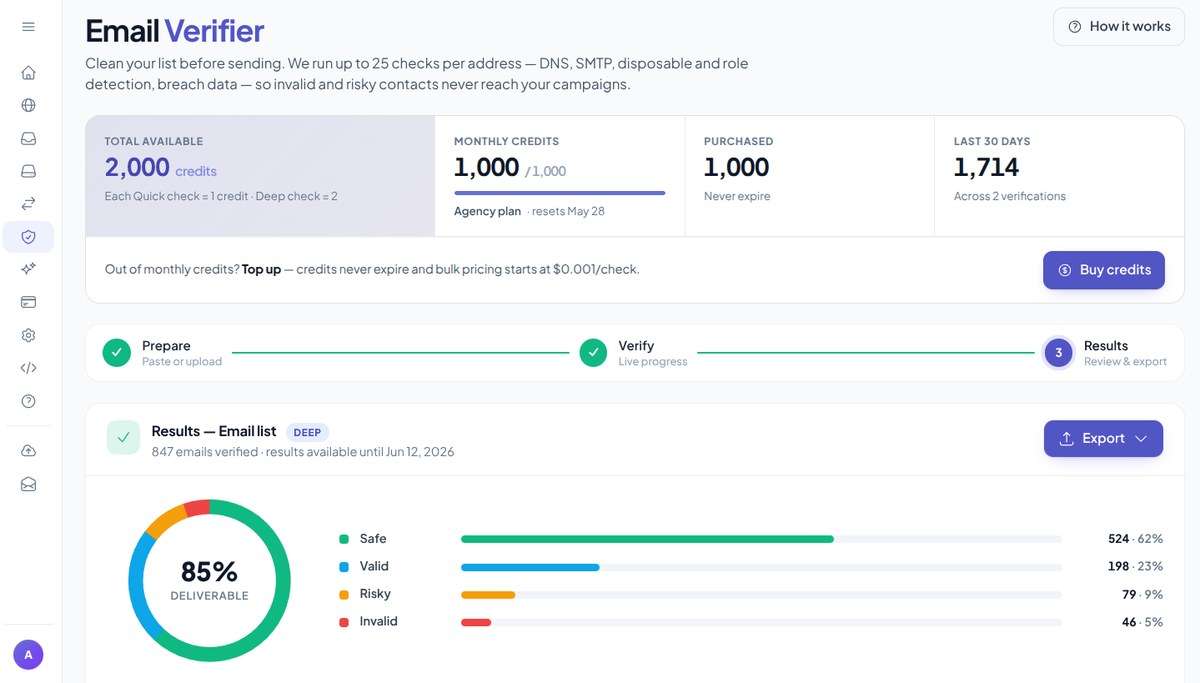
A checked list: safe, valid, risky and invalid, with an export button.
How it works.
- Paste addresses or upload a spreadsheet. Up to 50,000 per list.
- TrekMail checks each one. It catches typos, fake and throwaway addresses, domains that can't receive mail, and more.
- Download the clean list.
Two levels of checking. A quick check runs 23 tests per address. A deep check adds one more step: it asks the receiving mail server whether the inbox actually exists.
What it costs.
- Every plan comes with free checks each month: 10 on the free plan, 100 on Starter, 300 on Pro and 1,000 on Agency.
- Need more? Packs start at $5 for 1,000 checks, and they never expire. With White Label, packs are 20% off.
- You can also check one address an hour on our website without signing up.
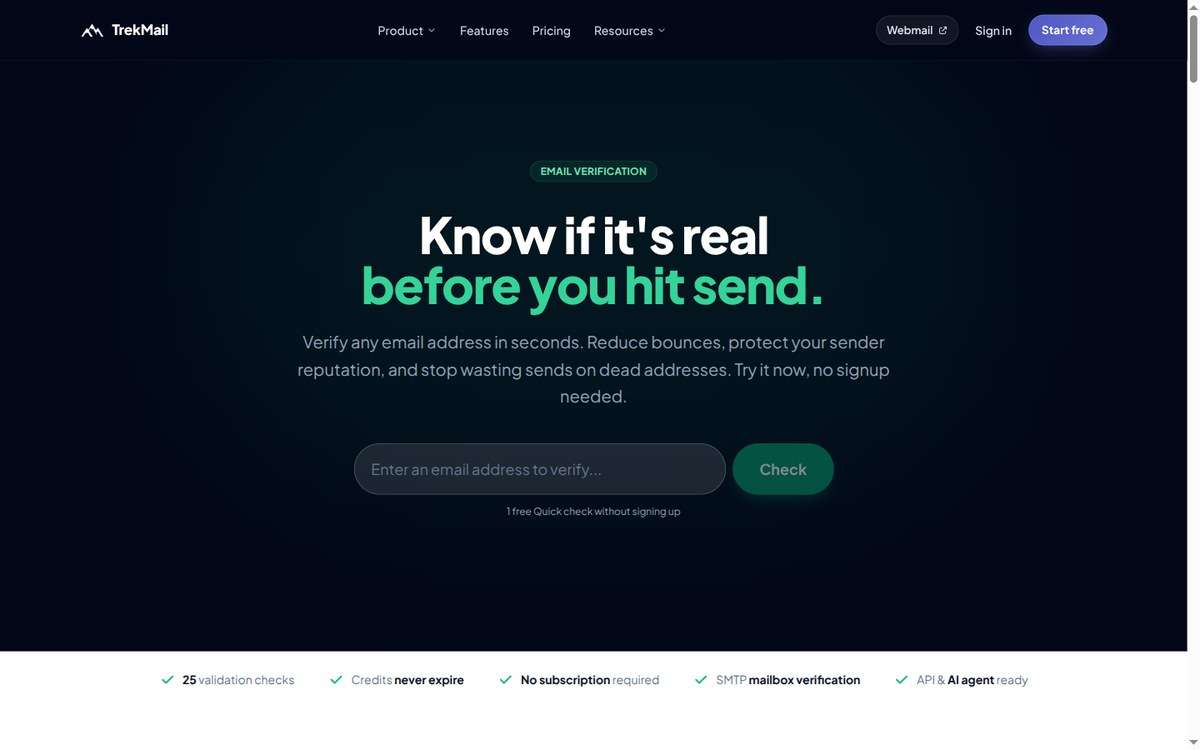
Try it on the website, no account needed.
White Label: run email for clients under your own brand
This one's for agencies. Maybe you build websites for guesthouses, run a tour company with a few brands, or set up email for small business clients. White Label lets you offer a complete email service with your name on it.
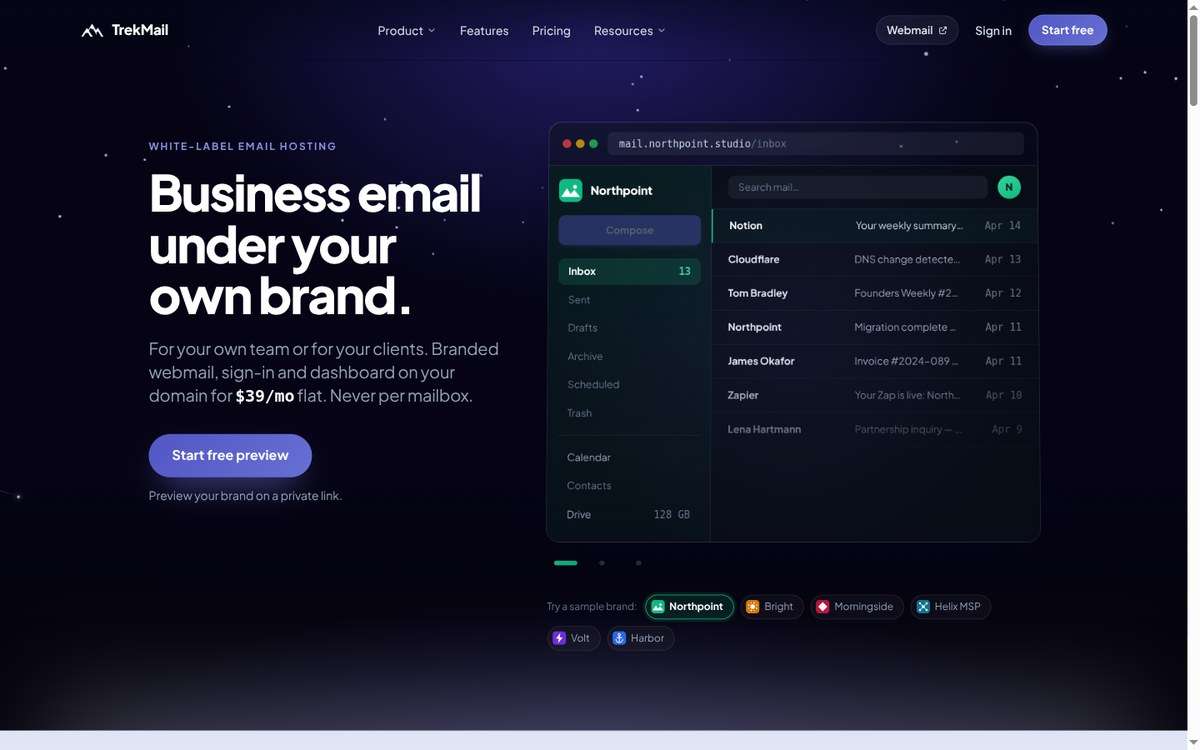
Your clients see your brand and your web address. TrekMail stays in the background.
Your brand everywhere.
- Your logo, colors and name on the dashboard and the web inbox.
- Both run on your own web address, like mail.yourstudio.com.
- Even the settings your clients type into their email apps show your brand.
- System emails, like password resets, come from your address.
Clients only see what's theirs.
- Invite clients and teammates with ready-made roles. A client can manage their own domains and inboxes, and a staff member can simply read their mail.
- Need something in between? Build a custom role.
- Nobody sees your billing, your other clients or your settings.
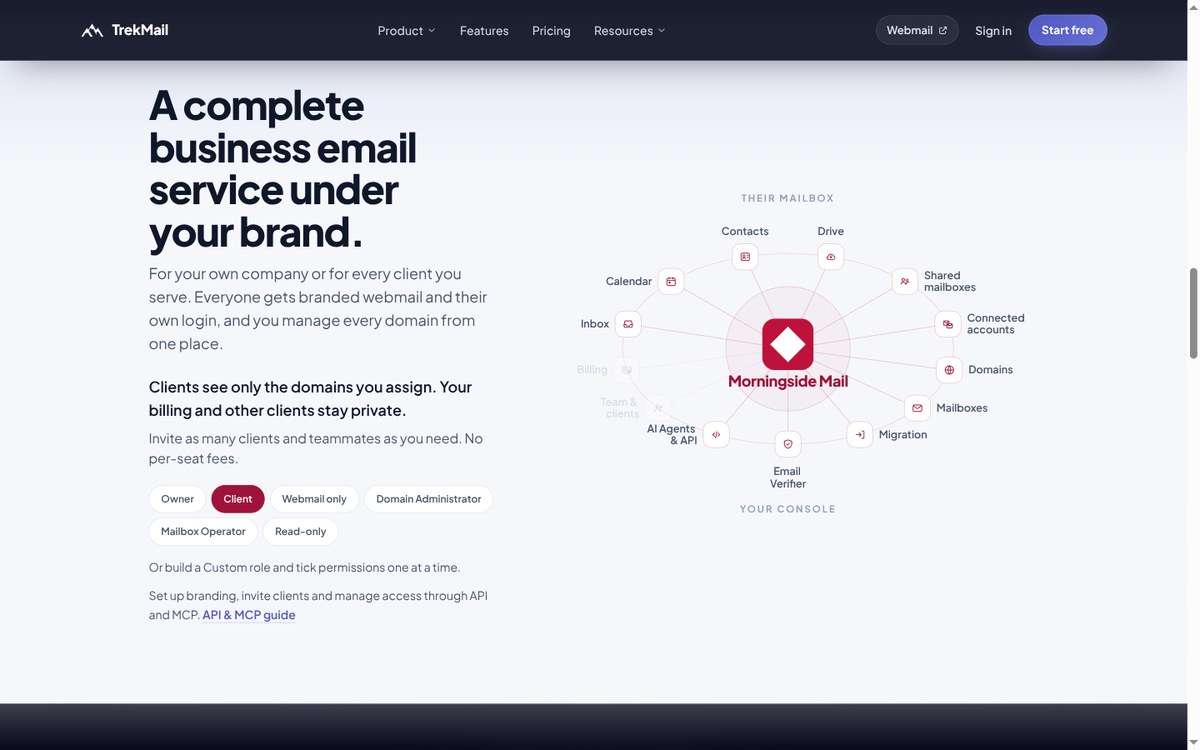
Inbox, calendar, contacts, Drive and more, all under your brand. You pick who sees what.
Go live in three steps. Add your name, logo and colors. Choose the web addresses for your dashboard, inbox and email apps. Then connect your domain, and TrekMail handles the secure setup from there.
Try it free first. Set a name, a logo and a color, and your real branded dashboard and inbox open on a temporary address. No card needed. There's a finished example brand on our website too.
One flat price.
- White Label is $39 a month or $389 a year. It works with any TrekMail plan, even the free one.
- On any paid email plan, it drops to $35.10 a month, or $350.10 a year.
- The price stays the same however many clients and inboxes you add.
- White Label also takes 10% off Drive storage and 20% off extra address checks.
- When you're ready to go live, you get a 30-day free trial.
Your business, your rules. You set your own prices, choose how your clients pay you, and bundle things however you like. TrekMail stays out of the money between you and your clients. Whatever you charge above your TrekMail bill is yours to keep.
Here's the example from our White Label page. Charge 200 inboxes at $3 each and you bring in $600 a month. Your TrekMail bill for a Starter plan, 250 GB of Drive and White Label comes to $41.98. That's a 93% margin.
Let AI do the busywork
If you use ChatGPT, Claude or a similar assistant, you can connect it to TrekMail and ask it to do real work:
- "Add my new domain and create inboxes for these four people."
- "Find last month's invoices and save the PDFs to Drive."
- "Check this list of contacts before I send my newsletter."
Each of these becomes one request instead of an afternoon.
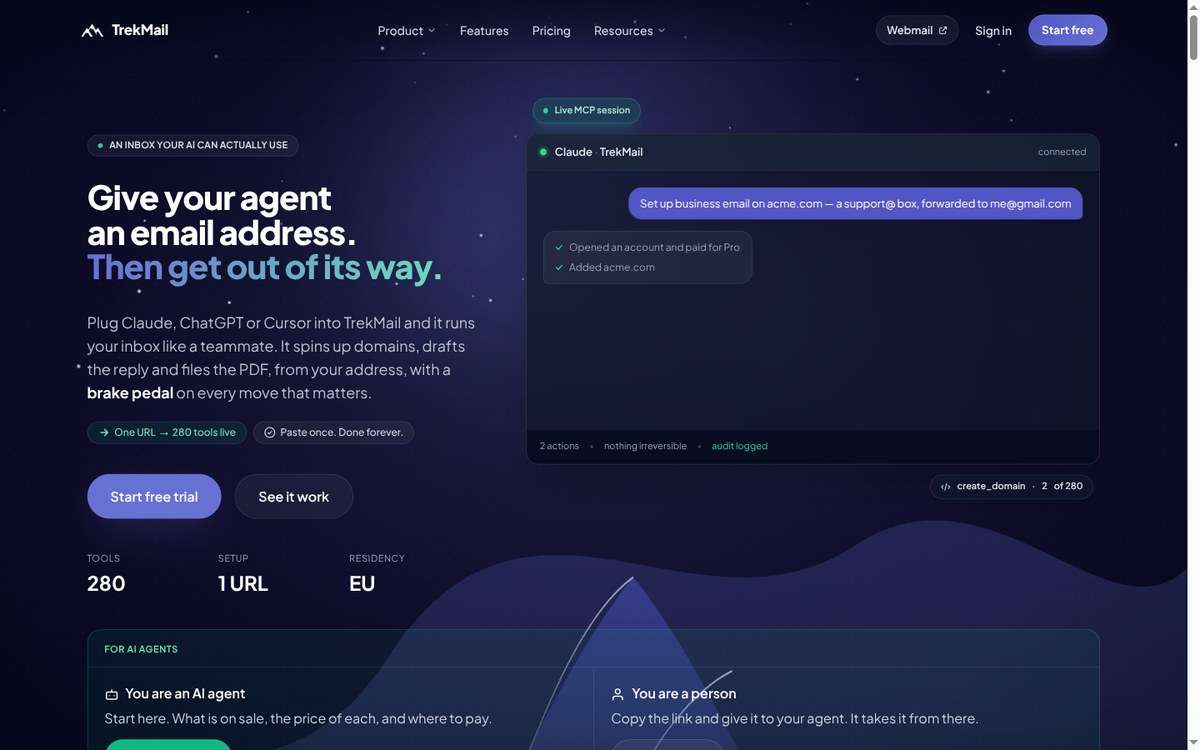
Connect with one link. The assistant works in your account, and every step is logged.
You stay in control.
- You choose what the assistant is allowed to do.
- Anything risky, like deleting an inbox or sending an email, needs a second confirmation.
- Everything it does is logged, so you can always see what happened.
It comes with your plan at no extra cost. TrekMail works with Claude, ChatGPT, Cursor and other popular assistants, and it's listed in Claude's connector directory. An assistant can even sign you up and buy a plan for you, within spending limits.
Free tools anyone can use
A few things on trekmail.net are free, no account needed:
- An email setup checker that tells you whether a domain is ready to send and receive mail, and what to fix if it isn't.
- A strong password generator.
- Private Notes. Write a message, send a link, and the note deletes itself once it's read. You can add a password and an expiration time. It's handy for sending a password or a booking code without leaving it in someone's inbox forever.
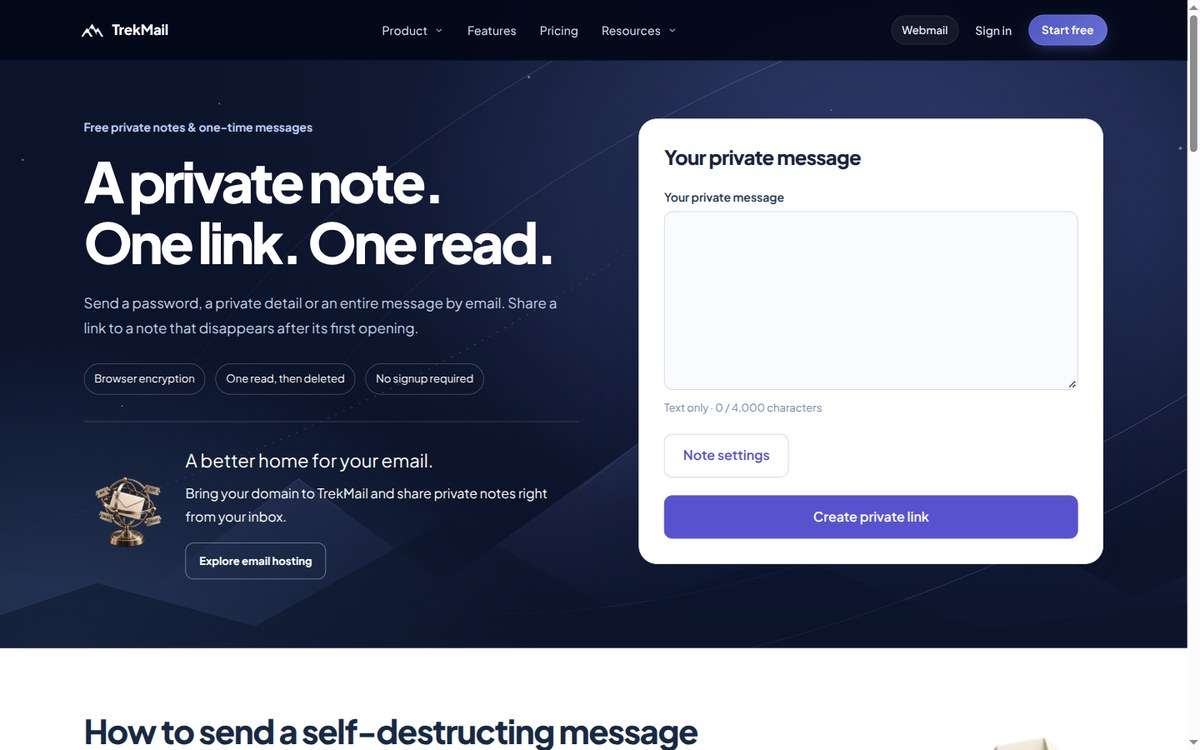
A private note. One link. One read.
Help when you need it
- A help center with more than 220 step-by-step guides, from connecting a domain to setting up your phone.
- Support tickets, whenever you need a hand.
- A live status page at status.trekmail.net, so you always know whether something's going on.
Plans and pricing
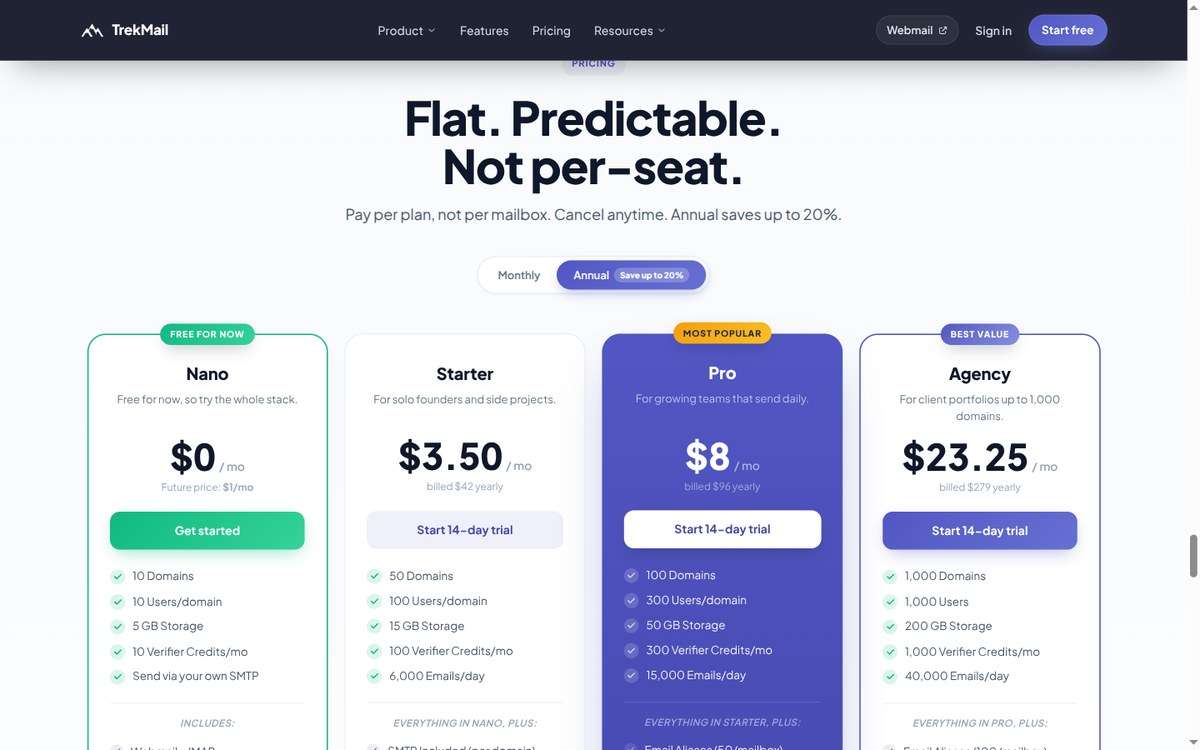
Flat prices per account. Paying yearly saves up to 20%.
Nano: free
- 10 domains, with up to 10 inboxes each
- 5 GB of storage shared by everyone
- 10 address checks a month
- Send through your own sending service
Starter: $4 a month, or $42 a year
- 50 domains, with up to 100 inboxes each
- 15 GB of shared storage
- 30 extra addresses per inbox and 5 shared inboxes per domain
- Up to 6,000 emails a day
- 100 address checks a month
Pro: $10 a month, or $96 a year
- 100 domains, with up to 300 inboxes each
- 50 GB of shared storage
- 50 extra addresses per inbox and 15 shared inboxes per domain
- Up to 15,000 emails a day
- 300 address checks a month
Agency: $29 a month, or $279 a year
- 1,000 domains, with up to 1,000 inboxes each
- 200 GB of shared storage
- 100 extra addresses per inbox and 30 shared inboxes per domain
- Up to 40,000 emails a day
- 1,000 address checks a month
A free plan that's actually useful. Free plans are rare in business email, and the few that exist usually lock you into their own app. TrekMail's Nano plan is free and works with any email app. You get 10 domains, 10 inboxes per domain, 5 GB of storage and the full web inbox.
To send from the free plan, you connect your own sending service. That's deliberate, and it works in everyone's favor. Free accounts never send through our servers, so spammers can't use them to hurt anyone's delivery. The reputation that paying customers rely on stays clean, and their mail keeps landing in inboxes.
Paid plans come with a 14-day free trial. Pay by card, Apple Pay or Google Pay, and yearly plans can also be paid in crypto.
Earn by sharing.
- Refer a friend who signs up for a paid plan and you get a free month. It works even if you're on the free plan.
- Refer ten and you get 10% off for life.
- Prefer cash? Approved affiliates earn 30% to 40% of what their referrals pay for 12 months.
Questions people ask
Is there really a free plan?
Yes. The Nano plan is free, with 10 domains, the full web inbox and any email app you like. You send through your own sending service, which keeps the platform clean for everyone.
Do I need to be technical to use it?
No. TrekMail walks you through every step and checks your work. If your domain is on Cloudflare, it can even do the setup for you.
Can I keep using my Gmail or Outlook account?
Yes. You can connect those accounts and read them right next to your new business inbox, and replies still go out from the right address.
Will my old emails come with me?
Yes. Import them from Gmail, Outlook, Yahoo, iCloud or almost any other provider. Your old account isn't changed, so nothing gets lost along the way.
Does it work on my phone?
Yes. Use the web inbox in your phone's browser, install it like an app, or add your address to the email app you already have.
Can my team share one inbox?
Yes. Shared inboxes let several people answer the same address, like support@ or bookings@, each with their own sign-in.
Can I offer email to my clients?
Yes, that's exactly what White Label is for. Your clients get a full email service under your brand.
Why I'm telling you about it here
Both products come from the same belief: you should own what you build, and the tools you pay for should stay out of your way.
TrekGuider gives creators a fair place to sell what they know. The commission goes down as you grow, and your work stays yours. TrekMail gives you email at one price for the whole team, and an address that belongs to you, not to your provider.
If you sell on TrekGuider and still run your business from a personal inbox, this is the easiest upgrade you'll make this year. Start at trekmail.net.
Working with clients? Check out White Label. Shooting more footage than your laptop can hold? Try TrekMail Drive.
Got questions about either one? Write to me. I read everything.
Alexey Bulygin
Founder of TrekGuider and TrekMail




Comments 0
No comments yet
Be the first to share your experience!
You May Also Like

FTC Affiliate Disclosure: Stay Compliant as a Travel Creator


Essential Affiliate Tools: From Tracking to Full Optimization

Avoid These 5 Affiliate Landing Page Mistakes for Better Conversions

Affiliate Keyword Research Mastery for Travel Blogs

Booking.com Affiliate Review: Pros, Cons & Earnings
